HELP CENTER
What you can do with DZ Chat
DZ Chat is DriveZ's multilingual chat, connecting passengers, drivers, company staff, and DriveZ. You open it from the DDash Passenger app.
Last updated: 2026-10-05
What is DZ Chat?
DZ Chat is DriveZ’s multilingual chat. It connects passengers, drivers, company staff, and DriveZ, and messages are automatically translated between Japanese, English, and Thai.
How to open it
Open DZ Chat from the DDash Passenger app. If you’re signed in to DDash Passenger, you don’t need to sign in to DZ Chat separately.
If another passenger invited you, install DDash Passenger and enter your invitation code from the login screen to get started.
The home screen
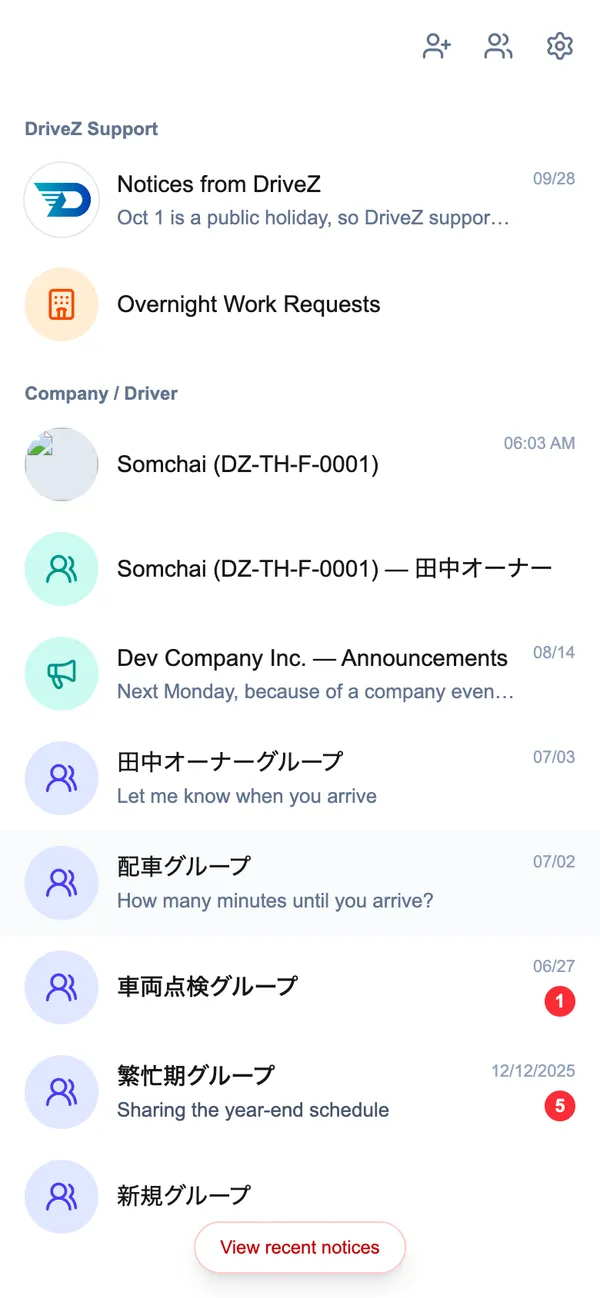
When you open DZ Chat, you’ll see your chat list. Only sections that have something in them are shown.
| Section | What’s in it |
|---|---|
| DriveZ Support | Notices from DriveZ and Overnight Work Requests |
| Company / Driver | Your chat with your driver, and group chats |
“Overnight Work Requests” is shown when your company’s staff has allowed you to use it.
Three icons appear at the top of the screen.
| Icon | What it’s for |
|---|---|
| Invitations | Invite family or colleagues |
| New group | Create a group chat |
| Settings | Change your display language and more |