HELP CENTER
Account information and notification settings
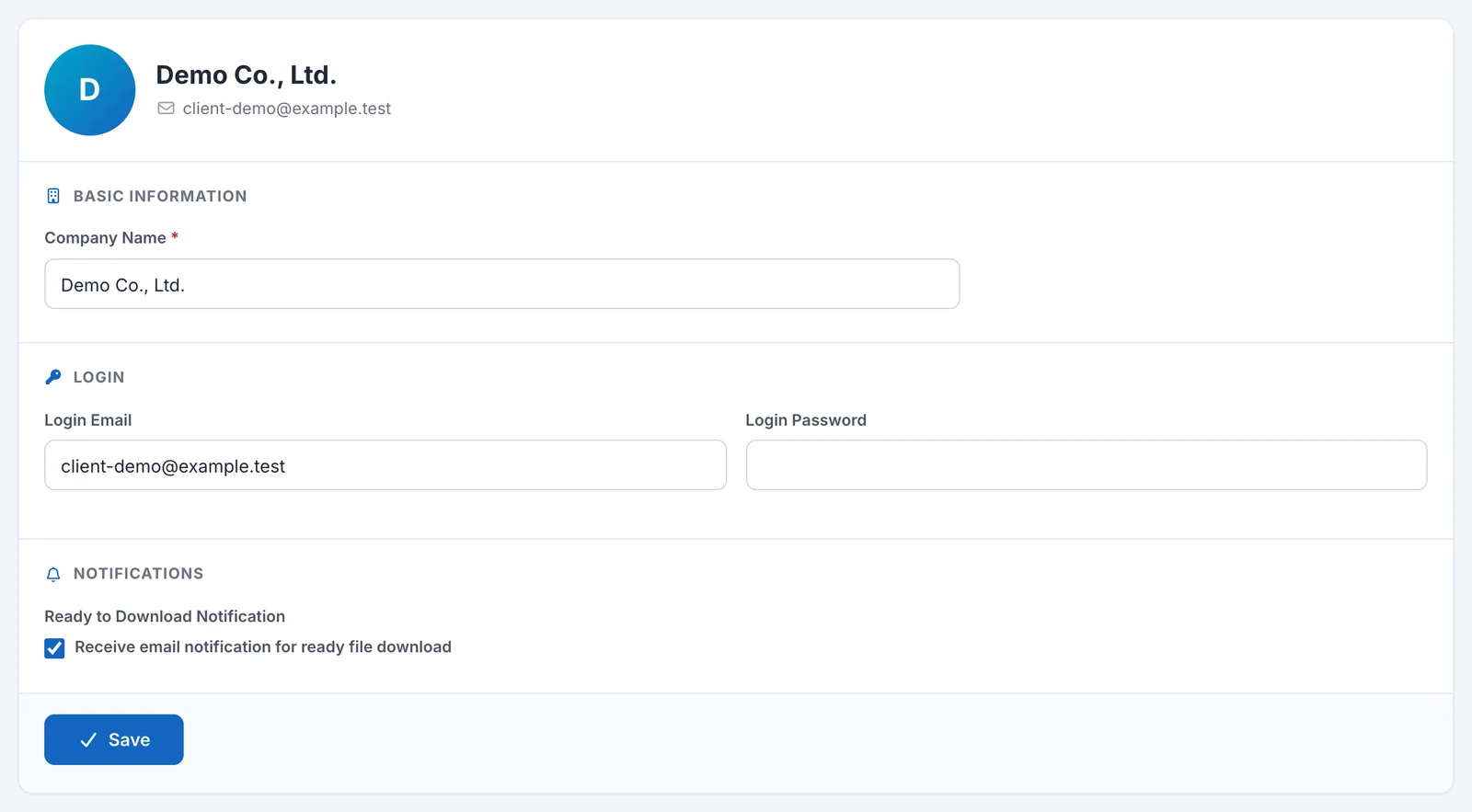
From Profile in the account menu at the top right, you can change your company name, login email, password, and whether you receive the export-ready email.
Last updated: 2026-11-04
What you can change
In Profile, you can change the following items for your company account.
- Click the account menu at the top right of the screen (the button showing your company name).
- Click “Profile”.
- Change the items and click “Save”.
| Section | Item | Description |
|---|---|---|
| Basic information | Company Name | The company name shown at the top of the screen and in the account menu. Required. |
| Login | Login Email | The email address you use to sign in. Required. You cannot use an address that another account already uses. |
| Login | Login Password | The password you use to sign in. Required. |
| Notifications | Ready to Download Notification | If checked, you receive an email when an exported file is ready to download. |
If you change your login email or password, use the new values the next time you sign in.
What you cannot change
You cannot change any other items from Profile. DriveZ manages the settings for the features available to you, such as correcting timesheet times and editing the calendar. If you want to change them, please contact DriveZ.
Receiving the export-ready email
This setting sends you an email when an exported file is ready to download.
- Open Profile.
- Under “Notifications”, check “Ready to Download Notification”.
- Click “Save”.
If you do not want to receive it, uncheck the box and click “Save”.